KEY TAKEAWAYS
- Backup Select works without a battery. It draws power directly from your solar panels during the day, so there's no battery to buy, maintain, or replace.
- It covers 5 to 7 essential circuits, not your whole house. Think fridge, freezer, Wi-Fi, some lights and outlets, maybe a space heater. Central air, electric ranges, and other big 240-volt loads aren't included.
- The switch to backup power is automatic. A sensor detects the outage and flips your protected circuits over in seconds, whether you're home or not.
- It only works during daylight hours. Once the sun goes down, so does your backup power, unless you add a battery later.
- It costs a fraction of a full battery system. Adding Backup Select typically costs around $1,000 plus $1,500-$3,000 per Sunny Boy inverter, compared to $20,000+ for battery backup.
A lot of homeowners assume that once they have solar, they automatically have backup power too. That's not true, and it's one of the most common mix-ups we hear. Most grid-tied systems shut off when the grid goes down, as a safety requirement. Here’s more on what happens to grid-tied solar in a power outage.
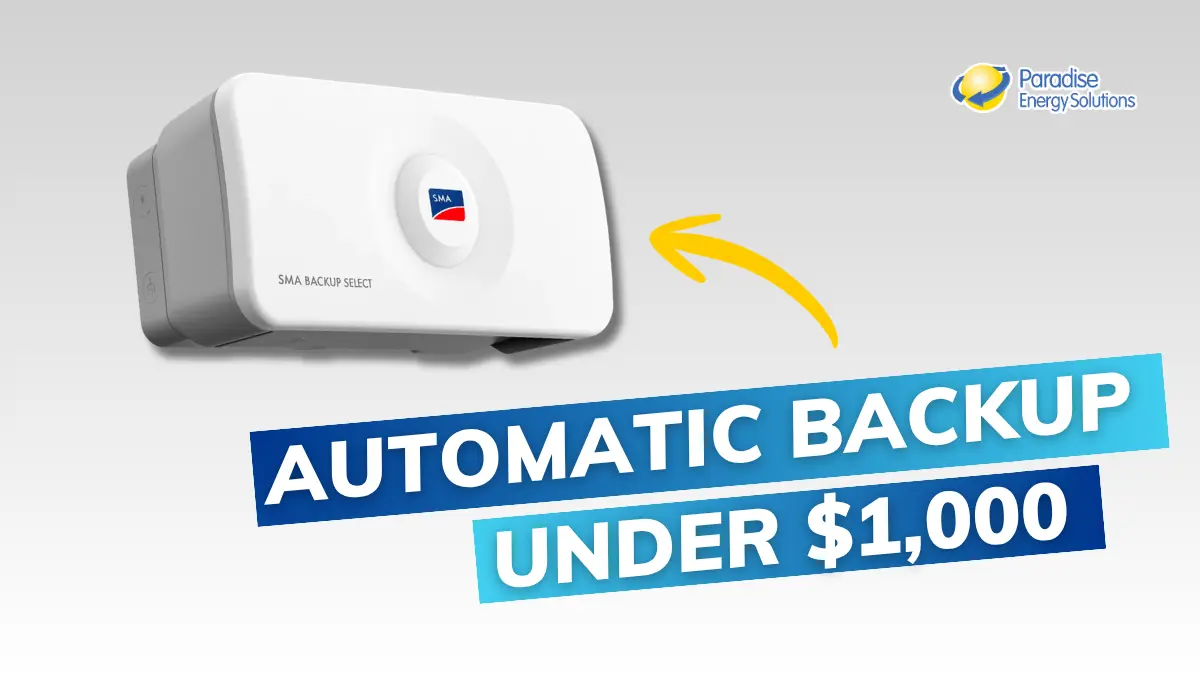
SMA Backup Select is one way to close that gap. It's a simple add-on that gives you automatic backup power for a handful of essential circuits, without the cost or complexity of a solar battery system. It's not the right fit for everyone, and it won't cover everything in your home. However, it's a great alternative to batteries for daytime, short-term outages.
This guide explains what it does, what it costs, and how to tell whether it's the right solution for your home.
Paradise Energy’s own VP of Design & Procurement, Larry Beiler, installed Backup Select at his own home. While discussing his choice of system, Larry says, "When we looked at an inverter, it wasn't that difficult of a decision. At Paradise Energy, we've worked with SMA for quite a few years and really trust and appreciate their products. What really sold me on this solution, though, was that for this particular inverter and the Backup Select system, I can actually back up loads during an outage [and] during the day when the sun is out." Below, you can watch a video of him and Rob Lamendola, a product manager at SMA, discussing the device and simulating a live outage. This video is referenced throughout the guide below.
What Is SMA Backup Select and How Does It Work?
SMA Backup Select is a small wall-mounted box that works together with SMA’s Sunny Boy Smart Energy inverter, a hybrid solar inverter. Together, they let you pick a handful of circuits in your home, the ones that are hard to live without, and keep those circuits running automatically during a daytime power outage.
Here's the physical setup: a conduit runs from your solar inverter into the Backup Select box. Another conduit runs from the box to a disconnect switch and into your main breaker panel. Two more conduits connect the box to a junction box, where the specific circuits you chose get tapped and rerouted into the Backup Select box.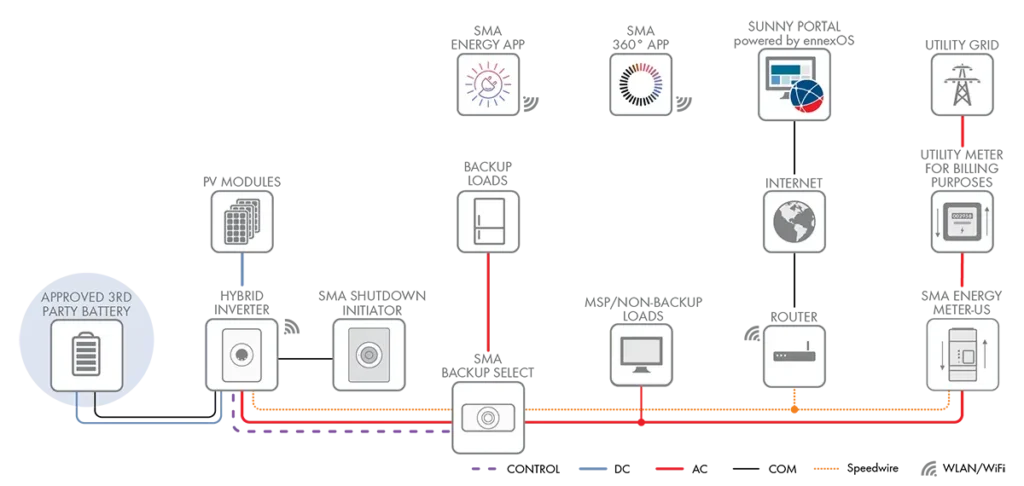
From a technical standpoint, Backup Select is more than a simple transfer switch. The integrated subpanel is purpose-built to isolate and automatically energize critical loads while maintaining utility-interactive safety requirements. That means homeowners get backup functionality without the complexity, footprint, or commissioning requirements of a traditional battery-based backup architecture.
Inside the box, you'll find 8 breaker slots: one main breaker, plus five 1-pole 15-amp breakers and two 1-pole 20-amp breakers. That gives you 7 circuits (120V) total to assign to whatever you want to keep powered.
How Much Power Is That?
Depending on which Sunny Boy Smart Energy inverter you have, Backup Select can supply up to about 3,840 watts (SBSE 3.8 to 7.7) or 5,760 watts (SBSE 9.6 and 11.5) while your panels are producing at full strength. For perspective, a refrigerator uses a few hundred watts once it’s running, a Wi-Fi router and a few LED lights use well under 100, and a small space heater draws about 1,500. On a sunny day, a fridge, a freezer, internet, lights, and one space heater can fit comfortably. On a cloudy day, your panels produce less, so the backup power available drops with them.
If you’ve heard of SMA’s Secure Power Supply, that’s the older feature on earlier Sunny Boy inverters: a single outlet on the inverter that you plug into by hand during a daytime outage. Backup Select takes the same idea further, with automatic switchover and up to 7 circuits wired into your home.
In Larry's case, he chose:
- Kitchen refrigerator & multiple freezers (food for the family)
- Multiple outlets for lights, to keep the internet on, phones charged, and to power small space heaters (comfort for the family)
How the Automatic Transfer Actually Works
You don't have to do anything when the power goes out. Your Sunny Boy Smart Energy inverter has a built-in sensor that detects the grid outage and sends a signal to the Backup Select box, which switches your protected circuits over on its own.
In our live demo, Larry and Rob cut power to the whole house to simulate a real outage. Within seconds of the outage starting, the relay clicked, and the protected circuits received power. According to SMA's installation documentation, that switchover window is adjustable and defaults to about 5 seconds, which matches the results of our demo.
This also means the system works whether you're home or not. If you're away when a daytime outage hits, your fridge and freezer keep running without you having to do a thing.
What Happens When the Grid Comes Back On
SMA designs the system for an automatic, seamless transition in both directions, into backup mode when the grid goes down, and back to normal grid power once it’s restored. You shouldn’t need to flip anything by hand or reset the system yourself when the outage ends. From there, your system goes back to working like any other grid-tied solar system.
What Backup Select Can't Do (and Where It Falls Short)
It only works when the sun is shining. Backup Select has no battery, so it can only supply power while your solar panels are actively producing it. Rob put it plainly: backup lasts "from sunrise to sunset," which averages 7 to 8 hours of coverage. Once the sun goes down, your protected circuits lose power too, unless you've added a battery. If your area tends to have multi-day outages, that's a real limitation to plan for, and a battery or generator may be a better solution.
It won't stretch past what your system can produce. If you overload the circuits you selected, for example, plugging in an extra space heater on a cloudy day, the system doesn't damage your equipment. It simply shuts down and will try to restart automatically. You may need to unplug the space heater or flip that breaker off to lower the load. Unlike a smart electrical panel and some battery systems, Backup Select doesn't automatically prioritize which loads matter more. It's a simple, reliable system, but that simplicity means you manage the load, not software, which has its pros and cons.
It covers only 1-pole breakers (120-volt circuits). Backup Select works with 1-pole breakers (120V) only. It doesn't cover larger 240-volt, 2-pole loads, like central air conditioning, an electric oven or range, or a heavy-duty well pump. If those are must-haves during an outage, this isn't the right solution for you.
The warranty is shorter than your inverter's. Sunny Boy Smart Energy inverters carry a 10-year warranty, extendable to 25 years. The Backup Select device itself carries a 2-year warranty. Breakers typically carry a 1-year warranty. They're not the same coverage, so ask your installer to spell out both terms clearly before you sign anything. If something goes wrong with the automatic transfer during an actual outage, your first call should be to your installer's service team, the same way you'd handle any other equipment issue on your system.
Where Does It Get Installed, and What Equipment Is Required?
The Backup Select box is rated NEMA 3R, which means it's weatherproof enough for indoor or outdoor mounting. Larry installed his in his utility room, right next to his main electrical panel, which is the most common setup. It's a compact unit, about 14” x 23” x 9” and just over 15 pounds, mounted to the wall with an included bracket.
Because it works with your existing solar equipment and taps into circuits you already have, adding Backup Select doesn't require the extra construction that a full battery backup does.
Larry made this comparison from his own install: with Backup Select, he has one box in his electrical room, and that's it. If he'd gone with a battery system instead, he would have needed a separate automatic transfer switch plus a good-sized battery, both taking up their own wall space. That's a meaningful difference in equipment footprint, not just price.
Backup Select is also flexible about what it pairs with on the solar side. It works with any solar panel brand, roof mount or ground mount, and main panels rated 100, 150, or 200 amps. The only requirement is on the inverter side: it’s built specifically to work with SMA’s Sunny Boy Smart Energy inverter. (New to inverters? Here’s how solar inverters work.)
So you'll need to go with Sunny Boy inverters if you're designing a new system. If you have an existing system with aging inverters, consider replacing them with Sunny Boy Smart Energy inverters and add Backup Select at the same time. If you're weighing that kind of upgrade, our guide on adding batteries to an existing solar system walks through how inverter compatibility typically works for retrofits.
SMA Backup Select Specs at a Glance
Here are the key numbers in one place:
| Spec | SMA Backup Select |
|---|---|
| Model | BU-SLCT-US-50 |
| Required inverter | SMA Sunny Boy Smart Energy |
| Max backup power | 3,840 W (SBSE 3.8 to 7.7) or 5,760 W (SBSE 9.6 and 11.5) |
| Backed-up circuits | Up to 7 at 120V (five 15-amp, two 20-amp), plus a main breaker |
| Main panel compatibility | 100, 150, or 200 amps, any solar panel brand |
| Enclosure | NEMA 3R, indoor or outdoor, about 14 x 23 x 9 in., just over 15 lb |
| Switchover time | About 5 seconds (default, adjustable) |
| Hardware price | About $740 to $790 for the device alone; about $1,000 installed |
| Warranty | Device 2 years, breakers 1 year, inverter 10 years (extendable to 25) |
| Setup | Commissioned by your installer in the SMA 360 App |
| Nighttime backup | Only with an added battery |
What Does SMA Backup Select Cost?
Compared to a home solar battery system, Backup Select is very inexpensive.
SMA’s Backup Select device costs roughly $1,000, including the backup box and the labor to wire in your selected circuits. Plus, you will need to change your inverters to SMA’s Sunny Boy Smart Energy inverters if you don’t already have them. This adds roughly $1,500 to $3,000 for each inverter, which is the average price range of a residential solar inverter.
A basic home solar battery system starts around $21,000, and advanced whole-home backup runs $85,000 or more. To size a battery for your own home, try our battery calculator.
SMA Backup Select vs. Your Other Backup Options
There's no single "best" backup option. It depends on how much coverage you need, how often you actually lose power, and what you're willing to spend. Here's how the main options stack up:
| Option | Typical Added Cost | What It Covers | Complexity |
|---|---|---|---|
| No backup | $0 | Nothing | None |
| SMA Backup Select | ~$1,000 for the backup device + $1,500–$3,000 for each Sunny Boy Smart inverter | 5 to 7 essential 120V circuits, daytime only | Low. Compact. One box, no battery. Silent. |
| Home battery backup | ~$20,000+ for a small system. ~$100,000+ for whole-home backup | A small system covers just the essentials. A whole-home system would power the full home, day and night | Higher. Transfer switch plus battery equipment. Silent. |
| Standby generator | Often five figures installed, varies by size and fuel type | Varies depending on the size, but it works day and night | Moderate to high. Needs fuel supply and regular maintenance. Loud. |
Backup Select vs. batteries: Backup Select is the lower-cost, lower-complexity option, but it trades away nighttime coverage and whole-home reach. A battery costs significantly more and takes up more space, but it can supply power day and night. Some use a battery alongside Backup Select to cover nighttime or extended outages.
Backup Select vs. a generator: A generator can often cover more of your home and run at night, since it doesn't depend on sunlight. But it comes with its own trade-offs: fuel storage, engine maintenance, noise, and typically a bigger upfront investment. Backup Select has no engine, no fuel, and nothing to maintain beyond your normal solar system. A generator can be a good companion to Backup Select if you want to ensure you have a source of power at night. Our guide on pairing a generator with solar battery backup covers how that combination typically works.
Backup Select vs. no backup at all: If you've never had backup power, even 7 to 8 hours of automatic coverage for your fridge, freezer, and a few outlets is a meaningful upgrade for a relatively small add-on cost.
Is SMA Backup Select Right for You? A Self-Fit Checklist
Backup Select is probably a good fit if:
- You mostly experience short, occasional daytime outages
- You want your fridge, freezer, Wi-Fi, gas appliances, and a few outlets and lights covered without the high cost of batteries
- You don't need to have major 2-pole 240-volt loads that need to run during an outage
- You want backup power added to your project for a relatively small cost
- You're open to adding a battery down the road if your needs change
You should look at a battery system or generator instead if:
- You want your entire house backed up, including central air, an electric range, or a large well pump
- You have medical equipment that needs guaranteed power, like a CPAP machine or similar critical device
- You regularly experience extended outages of four or five days or more, such as from hurricanes or major storms
- You need backup power overnight, not just during daylight hours
Common Questions About SMA's Backup Select Device
These are the questions many homeowners ask when they are considering investing in SMA's Backup Select device for their home.
What does SMA Backup Select actually cover?
It covers up to 7 essential 1-pole 120-volt circuits that you choose ahead of time, things like a refrigerator, a freezer, gas appliances, some outlets, and lights. It does not cover 2-pole 240-volt loads like central air conditioning, electric ranges, or large well pumps, and it only supplies power during daylight hours.
Will Backup Select work with my current solar system?
It’s flexible on most fronts. It works with any solar panel brand, roof or ground mount, and main panels rated 100, 150, or 200 amps. The only fixed requirement is the inverter: Backup Select is built specifically to pair with SMA’s Sunny Boy Smart Energy inverter, so if you have a different inverter, you’ll need to replace it as part of the install.
Is the switch to backup power really automatic?
Yes. A sensor in the inverter detects the outage and signals the Backup Select box to switch your chosen circuits over to solar power, typically within about 5 seconds. There’s no manual step, and it works even if no one is home.
What happens when the power comes back on?
The system is designed to automatically transition back to normal grid power, the same way it switches into backup mode. You shouldn’t need to reset anything by hand.
Where does the Backup Select box get installed?
It’s rated for both indoor and outdoor mounting. Most installations put it in a utility or electrical room next to the main breaker panel.
Does adding Backup Select change my installation cost or timeline?
It adds a modest amount to a standard solar installation, roughly $1,000 for the device and installation labor. Permitting and timeline impacts can vary by location, so ask your installer how it affects your specific project, but overall, it adds very little additional labor time to your installation.
However, keep in mind that these devices integrate with SMA’s Sunny Boy Smart Energy inverters. If you don’t have those, you will need to upgrade your inverters, which will increase the cost. A residential inverter typically costs between $1,500 and $3,000 each.
Is Backup Select covered under the same warranty as my inverter?
No. The Sunny Boy Smart Energy inverter carries a 10-year warranty, extendable to 25 years. The Backup Select device itself carries a 2-year warranty. If something goes wrong with the automatic transfer during an outage, contact your installer’s service team the same way you would for any other equipment issue.
How does Backup Select compare in cost to a battery or generator?
Backup Select adds roughly $1,000 to a standard solar install, plus $1,500 to $3,000 per inverter if you need to upgrade to a Sunny Boy Smart Energy inverter (required for this device). A home battery backup system typically starts around $21,000 for a basic system and can reach $85,000 or more if you’re going for whole-home coverage. Generators vary widely by size and fuel type but often run into five figures installed and come with ongoing fuel and maintenance costs. The tradeoff with Backup Select is that you’re covering a handful of essentials instead of your whole home, and only during daylight hours when your solar panels are producing.
Can solar work during a power outage without a battery?
Usually not. Most grid-tied solar systems shut off during an outage for safety, even when the sun is out. SMA Backup Select is one of the exceptions: paired with a Sunny Boy Smart Energy inverter, it keeps up to 7 essential circuits running on solar power during daytime outages, no battery required. Once the sun goes down, those circuits lose power until the grid comes back or you add a battery.
Is SMA Backup Select Right For Your Family?
The biggest mistake homeowners make is assuming all backup solutions are priced similarly. In reality, the optimal solution depends on the loads you want to protect, your outage history, and your budget.
The next step is to talk with a solar consultant to map your actual circuits, estimate backup performance, and determine whether Backup Select, battery storage, or another approach delivers the best value.
Get a free quote, and we'll help you figure out what actually makes sense for your home, not just what sounds impressive on paper.